

Customer context, alongside the conversation
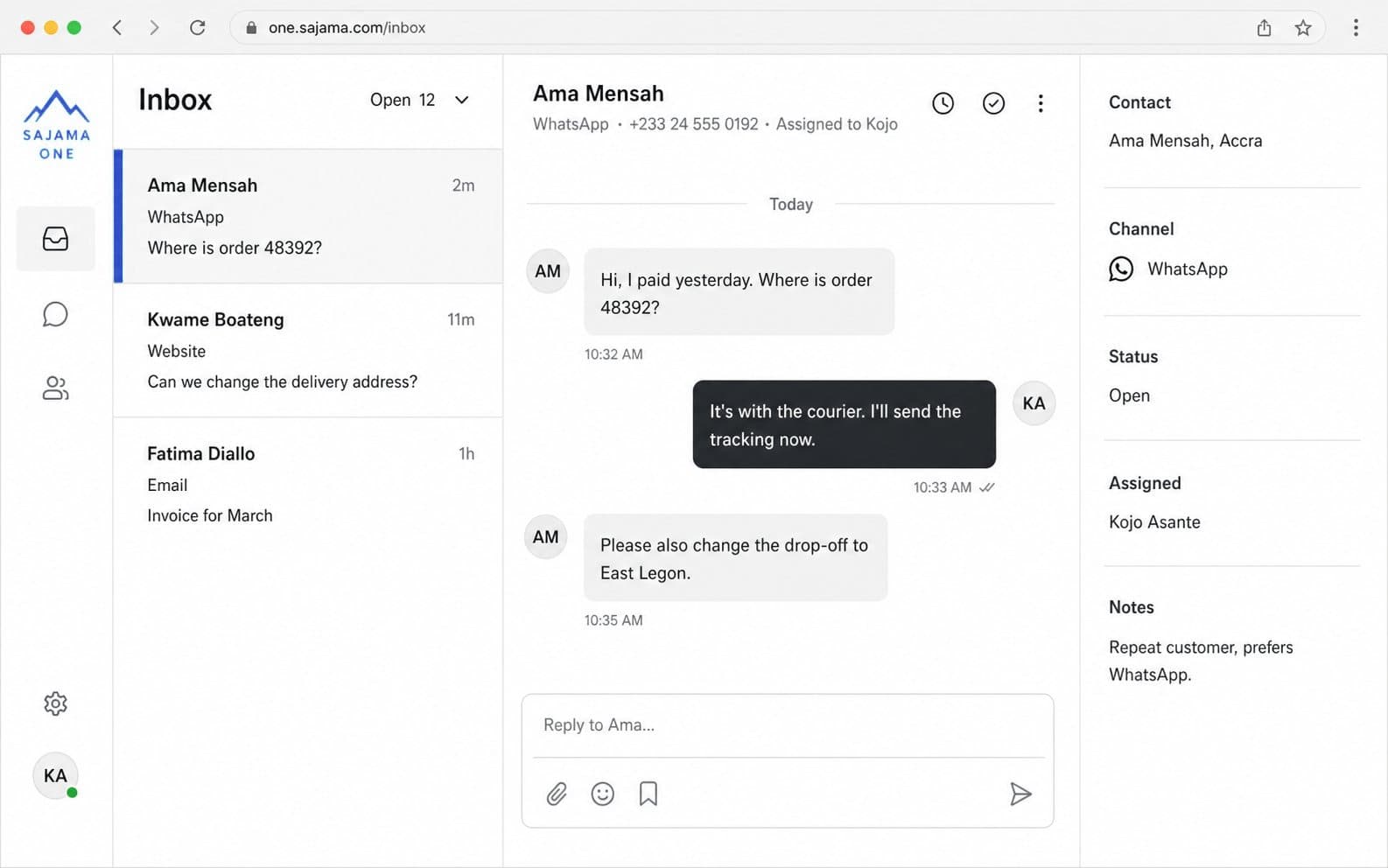
Keep contact details, notes, linked conversations, and deals together so your team can pick up the thread with context.
Every conversation from ten channels lands in one shared inbox your whole team can work. Replies use answers you choose to save; a person handles the rest.
No credit card required.
Trusted by teams at



The problem
Without one shared view, conversations get missed, customers repeat themselves, and follow-up is hard to track.
“Hi, is my order on its way?”
“Can I get a refund?”
“When will this be back in stock?”
“Hi, is my order on its way?”
“Can I get a refund?”
“When will this be back in stock?”
“Hi, is my order on its way?”
“Can I get a refund?”
“When will this be back in stock?”
“Hi, is my order on its way?”
Hi, is my order on its way?
Can I get a refund?
When will this be back in stock?
Inside the product
One queue for connected channels, customer context, saved answers, and work that needs a follow-up.
Every open conversation in the same list, labeled by channel. See what is open, who has it, and what came in last.
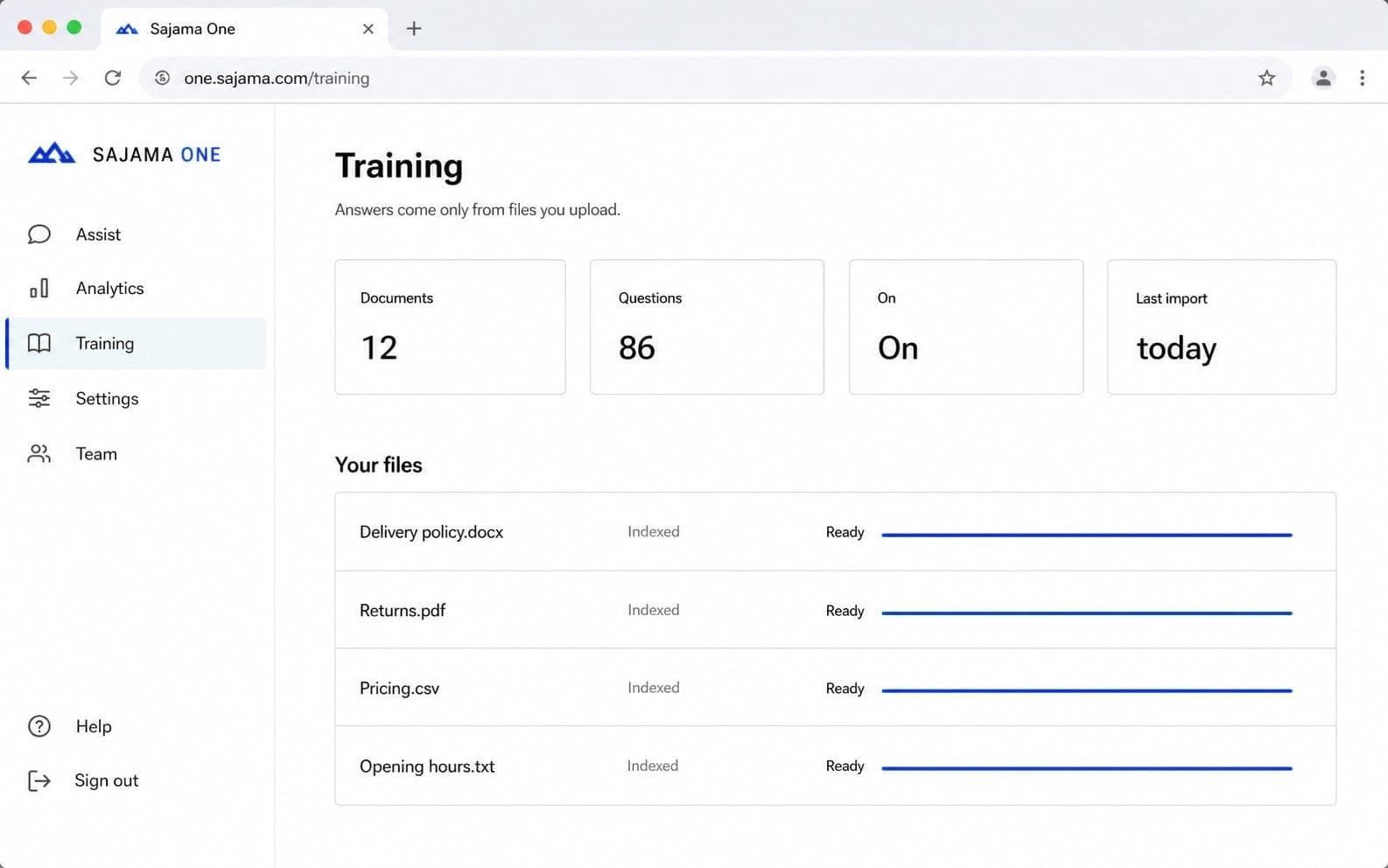
Upload the policies and FAQs your team already sends. Replies repeat only what you saved, on every channel you connect.
No match? An online teammate is offered the chat and the customer is told someone is joining.
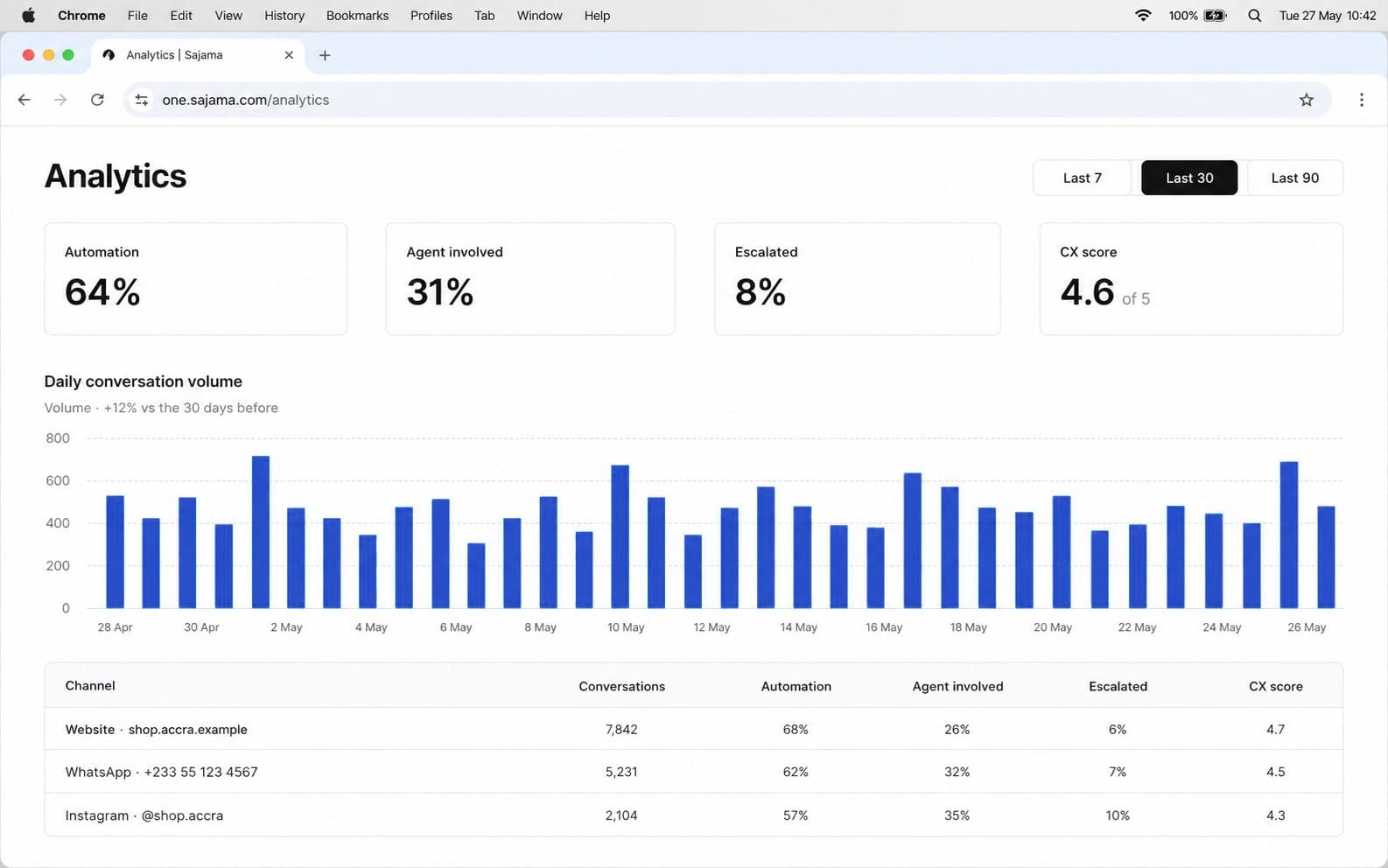
Volume by channel and site, first reply time, answer coverage, ratings, and why customers rated that way.
Keep contact details, notes, linked conversations, and deals together so your team can pick up the thread with context.
Put common questions and answers on a simple hosted help page. Your team chooses what to add; Sajama One does not crawl your website.
Open a numbered follow-up ticket from a conversation. Its reference stays visible in chat; your team can mark it fixed and send an update.
How it works
Start with your website, then add the channels and people you need.
Create a workspace and paste one snippet. Visitor conversations appear in the shared inbox.
Website chat is included on every plan.
Add your own FAQs and files. Matching questions receive the answer your team saved.
Replies use your saved words; they are not generated.
Work from the same queue, then connect more channels when you are ready.
Channel account limits depend on plan; pricing is per workspace.
Who it is for
One shared inbox for teams that handle customer questions directly.

Handle order questions across website chat, social messages, and other connected channels.

Assign conversations, leave internal notes, and see who is already handling each thread.

Keep replies grounded in your own policies and let a teammate handle questions that need judgment.
Channels
Website chat, WhatsApp, Instagram, Messenger, email, Telegram, Discord, Slack, LINE, and SMS arrive in one shared inbox.
Live chat on your site. Runs only on domains you allow. Included on every plan.
Included
Business conversations from the number customers already have saved, in the same queue.
Add when ready
A first in this category: a spare Android phone and its SIM become your business texting number. No rented virtual number and no per-message fees from us - texts arrive in the same inbox as everything else.
Add when ready
Direct messages from the account your team already runs, answered beside everything else.
Add when ready
Facebook Page messages in the same inbox as the website and the rest.
Add when ready
Support mail treated as a thread with history, not a forgotten folder.
Add when ready
Server messages and direct messages to your bot, answered from the same queue as everything else.
Add when ready
Customer conversations in Slack, without your team living in two tools at once.
Add when ready
LINE chats for customers in Asia, in the same inbox with the same history.
Add when ready
Another place customers write. Same inbox, same assignment, same analytics.
Add when ready
Pricing
Choose a plan by team size. Pricing is per workspace, not per agent. Paid plans include a 14-day trial, with no card required.
A 5-agent team pays from $145/mo on Intercom and $275/mo on Zendesk Suite. Every Sajama One plan covers the whole team.
Website chat for a tiny team, free forever.
A small team on every channel.
More seats, more accounts, teams and SLAs.
Larger inboxes without a second workspace.
Personal onboarding and a custom agreement.
Prices in USD. The Free plan is free forever. Paid plans start with a 14-day free trial. Cancel anytime from the Billing page. Competitor list prices checked October 2026.
Trust
The inbox contains customer details. Here is how Sajama One handles the work and the information in it.
Workspace data is separated by business and access follows team roles.
Internal notes and assignments are not shown to customers.
The website widget runs on the domains you allow.
Automatic replies use saved content; a person handles the rest.
Internal notes, tags and assignments stay inside Sajama One. Visitors see the chat, and a 1-to-5 rating if you ask for one.
A workspace can request access, correction or deletion at support@sajamaone.com. Full details are on the Privacy and Security pages.
FAQ
Still have a question? Email us at support@sajamaone.com
Create a workspace to use the full product for 14 days, with no card required. When the trial ends, choose a plan on the Billing page to continue. Your conversations remain in the inbox either way.
Website chat is built in. You can also connect WhatsApp, Instagram, Messenger, email, Telegram, Discord, Slack, LINE, and Android SMS.
Most teams start with the website widget: add one snippet, visitors can write, and conversations appear in the inbox. Add other channels when you are ready; the queue stays the same.
WhatsApp, Instagram and Messenger use your Meta app and credentials. Telegram and Discord need a bot token, Slack a Slack app, LINE a LINE channel, and email a forwarding address. Each channel takes a few minutes to set up.
Your team saves the questions, answers, and files. Sajama One matches incoming questions to that content; it does not crawl your website.
The conversation goes to an available teammate. Chats stay chats; a teammate can open a numbered follow-up ticket when work continues later.
Yes. Assign conversations, leave internal notes and see who is handling each one. Custom teams and SLA tracking are available on Growth and above. Pricing is per workspace, never per agent.
No. Live chats stay chats. An agent can open a ticket when work continues after the customer leaves, such as a refund or delivery follow-up.
Plans are priced per workspace, not per agent. Paid plans include a 14-day trial without a credit card.
Customer data stays in your workspace and access is limited to your team. Internal notes are never shown in customer-facing chat. See the Security and Privacy pages for details.
Start with website chat. Add the rest of your channels when your team is ready.
No credit card required.